One connected suite for the whole institution.
Recruit students. Run the student record. Support every learner. Manage research, finance, people and campus operations on a Microsoft-native foundation, with AI embedded across the suite and managed services to keep your investment growing after go live.
Student services and operations, together.
What would make the biggest difference at your institution?
Start with the work you need to improve. Find the products that support it, then plan how they connect to the wider institution.
Connect student records and institutional operations
Plan a unified SIS and ERP around the systems, data and processes your institution needs.
Explore SIS and ERPKeep recruitment and admissions moving
Bring enquiries, applications and follow-up together so teams can see what needs attention.
Give students help without growing the queue
Answer routine questions around the clock and bring in staff when students need a person.
Bring finance and student accounts together
Connect billing, budgets, purchasing and reporting with the wider institution.
Reduce the administration around research
Manage grant, contract and reporting activity without relying on separate records at every stage.
Reach learners beyond a full-time degree
Support short courses, continuing professional development and flexible pathways.
SIS Global Recognised as a Niche Player in the 2026 Gartner® Magic Quadrant™ for Higher Education SaaS Student Information Systems
31 March 2026
Explore the market context and Gartner’s evaluation criteria.
Read the Gartner disclaimerFind the right products for your institution.
Explore 15 products within one unified SIS and ERP platform. Browse by institutional area, or open a product to see the work it supports.
EDU365 SIS
Manage enrolment, curriculum, progression and graduation from a connected student record. Link academic administration with finance and institutional operations.
EDU365 Recruit
Keep enquiries, applications and follow-up in one place. Give recruitment and admissions teams a clearer view of each applicant and the next step.
EDU365 Student Support
Give students 24/7 answers from approved institutional information. Bring staff into the conversation when a question needs personal attention.
EDU365 Finance
Connect student accounts with institutional finance. Manage billing, budgets, general ledger, purchasing and reporting within the wider EDU365 platform.
EDU365 HR & Payroll
Bring employee administration, onboarding and payroll processes together. Give your people team a more consistent way to manage the employee lifecycle.
EDU365 Research
Keep grant applications, contracts, project activity and research reporting connected. Give your research office a clearer view from pre-award to completion.
EDU365 Lifelong Learning
Make short courses and continuing professional development easier to manage, with course discovery, online purchasing, learner records and digital credentials.
EDU365 Internationalization
Manage international partnerships and student mobility in one place. Track collaboration, grants and partner activity across your international programmes.
EDU365 Partnerships
Keep employer, industry and institutional relationships connected. Track partner activity, placements and collaboration without losing the history between teams.
EDU365 Academic Integrity
Manage academic misconduct cases consistently. Keep evidence, actions and records together, with reporting and educational interventions to support your processes.
EDU365 Facilities
Give campus teams a clearer view of space, assets and maintenance. Coordinate work orders and asset records across your estate.
EDU365 Fleet
See how campus vehicles are used and maintained. Connect vehicle tracking, driver management and fleet reporting to support transport operations.
EDU365 Alumni
Keep alumni and donor relationships active beyond graduation. Bring engagement history, fundraising and campaign activity into a shared view.
EDU365 Events
Coordinate open days, graduation and institutional events. Manage registration, attendance, guest information and venue logistics in one place.
EDU365 Credentials
Issue, store and verify digital academic credentials. Help graduates share their records and reduce the manual work involved in checking them.
View the full institutional capability map
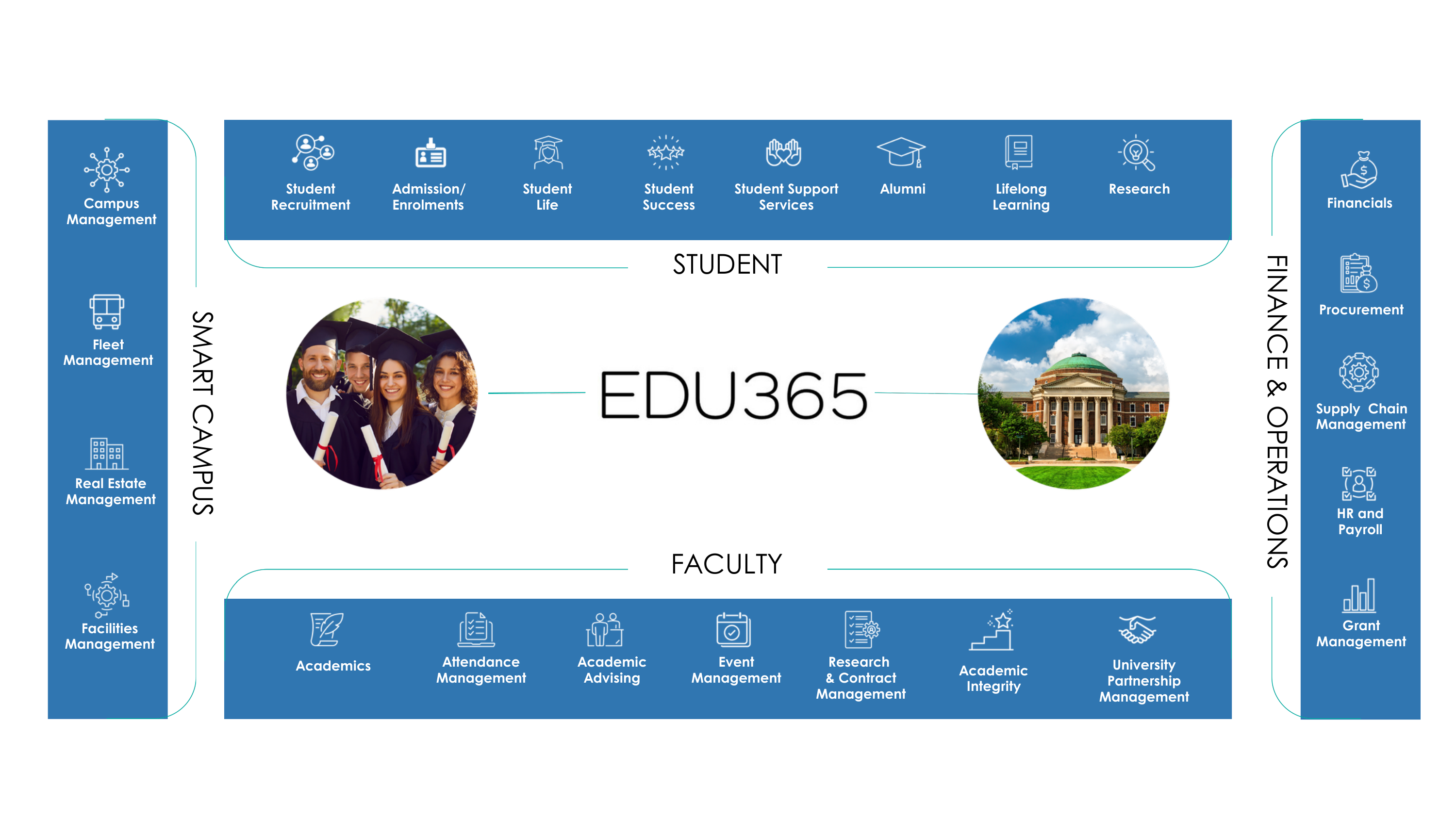
Explore the four areas covered by EDU365: student experience, academic and research activity, campus operations, and finance and institutional services.
AI agents that help move work forward.
EDU365 embeds specialised AI agents across recruitment, student support, academic progression, finance and operations. They can use approved institutional information, support defined workflow steps, surface what needs attention and hand decisions to people when judgement or approval is required.
Keep applications moving
Identify missing documents, prompt applicants and flag exceptions for admissions staff.
Answer questions, day or night
Use approved knowledge to answer routine questions, with conversation history available when staff take over.
Support academic advice
Help review programme requirements, course choices and graduation readiness. Academic approval stays with your institution.
Help staff move cases forward
Summarise conversations, suggest responses and surface the information staff need to take the next step.
See the specialist AI agents across EDU365
These agent groups support specific jobs across the suite. They are capabilities within EDU365 workflows, with human review and escalation where your process requires it.
Recruitment & admissions
- Admissions agent
- Missing documents agent
- Document intelligence
- Course recommendation
- Transcript evaluation
Student support & success
- Student support agent
- Communications agent
- Case management agent
- Student success intelligence
- Retention agent
Academic journey
- Programme mapping
- Curriculum advising
- Graduation readiness
- Standing & policy enforcement
Institutional operations
- Scheduling & space optimisation
- Finance agent
- Predictive analytics
- Institutional intelligence
- Human escalation
Your deployment defines the connected systems, approved information and points where a person takes over.
Specialist tools for assessment and school learning.
Add specialist capabilities where you need them. Dugga supports digital assessment in higher education and schools. Skooler and Edsby serve school and K–12 environments.
Dugga
Create, deliver and assess digital exams with a dedicated assessment platform for universities, colleges and schools.
For universities, colleges and schools
Skooler
Bring lesson planning, learning activities, assessment and family communication into a connected digital environment for schools.
For schools and school groups
Edsby
Connect learning, assessment, reporting, student insight and family engagement in a platform purpose-built for K–12 education.
For K–12 schools, districts and school groups
Partner solutions are selected and licensed to match your needs. SIS Global agrees availability, integrations and support responsibilities with your institution.
Keep what works. Plan what changes.
A phased plan starts with your existing systems, data and institutional priorities. Agree what connects, what changes and how your teams prepare before implementation begins.
Agree the priority
Define the first scope, decision-makers and measures of success.
Map systems and data
Identify integrations, data migration needs and access requirements.
Test and prepare
Agree validation, training and cutover responsibilities before launch.
Go live with support
Make service ownership and escalation routes clear to your teams.
Review and improve
Track adoption, review service performance and prioritise the next changes.
Timelines depend on the products, data and integrations in scope. Your delivery plan sets out the phases, responsibilities and acceptance criteria for your institution.
Questions before you take the next step.
Understand the scope, the connections and the service behind the platform.
Is EDU365 an SIS or an ERP?
Can we start with one product?
Can it work with systems we already use?
Can we add Student Support without replacing our SIS?
How do you approach data migration and go-live?
How are AI answers and decisions controlled?
What determines the cost?
Are the partner solutions included automatically?
What support is available after go-live?
Go live.
Keep getting better.
Your team needs a platform that keeps working and improving.
Plan the service relationship alongside your EDU365 implementation. Know who owns an issue, how it is escalated and how ongoing improvements are agreed, across the applications and Microsoft services in your plan.
Resolve issues with a clear owner
Application and platform support with agreed responsibilities, response targets and escalation routes.
Application & platform supportKeep the connected environment working
Coordinate support for the cloud, security, data and Power Platform services included in your plan.
Cloud, security & dataRun AI with ongoing oversight
Monitor agreed Copilot and agent workloads, manage changes and route operational issues to specialist support.
AI operations & governanceAgree what improves next
Use service reporting and quarterly reviews to prioritise improvements, support adoption and plan renewals.
Reviews & continuous improvementA service plan your team can work with.
Agree the platforms in scope, support hours, response targets, escalation routes and review cadence before service starts. Coverage follows your agreed service plan, including any partner-solution responsibilities.
See what your next phase could look like.
Bring your priorities and current systems. Explore where EDU365 fits, what a first phase could involve and the ongoing support your institution would need.
You do not need to know which products you need before we talk.
Gartner reference and disclaimer
Access the full report for market context and Gartner’s evaluation criteria. (opens in a new tab)
Gartner®, Magic Quadrant™ for Higher Education SaaS Student Information Systems, 31 March 2026
GARTNER and MAGIC QUADRANT are trademarks of Gartner, Inc. and/or its affiliates.
Gartner does not endorse any company, vendor, product or service depicted in its publications, and does not advise technology users to select only those vendors with the highest ratings or other designation. Gartner publications consist of the opinions of Gartner’s business and technology insights organization and should not be construed as statements of fact. Gartner disclaims all warranties, expressed or implied, with respect to this publication, including any warranties of merchantability or fitness for a particular purpose.
Partnerships, certifications and recognition